 MP3 Converter
FLAC to MP3 & MP3 to FLAC Converter
Our free FLAC to MP3 converter turns lossless FLAC tracks into 320 kbps MP3 files that play in any car, phone or music app. Add one song or a whole album, and everything converts right in your browser, so your music never leaves your device. Need the opposite? One tap switches the tool to MP3 to FLAC.
- 100% Private
- No Limits
- Free
- Any Device
Upload FLAC files to convert to MP3.
Supported formats: FLAC, ALAC, WAV and more, up to 500 MB per file
or drag and drop files here
Files are processed inside your browser and are never uploaded to a server.
A free online FLAC converter for everyday listening
FLAC (Free Lossless Audio Codec) keeps every detail of the original recording, which is why music fans rip CDs and buy hi-res downloads in it. The catch is size and support. A CD-quality album in FLAC usually takes 200 to 400 MB, and many car stereos, older MP3 players and the Apple Music app on Mac and Windows will not play it at all. As a result, a FLAC library is great at home but awkward on the road.
Converting FLAC to MP3 solves both problems. You get a copy that is roughly half to a quarter of the size and plays almost anywhere, while your FLAC files stay safe as your lossless archive. In addition, because FLAC is a perfect source, the MP3 you create here is as good as an MP3 can be. And if an app or upload form insists on FLAC, the same page also converts MP3 to FLAC.
How to use the FLAC to MP3
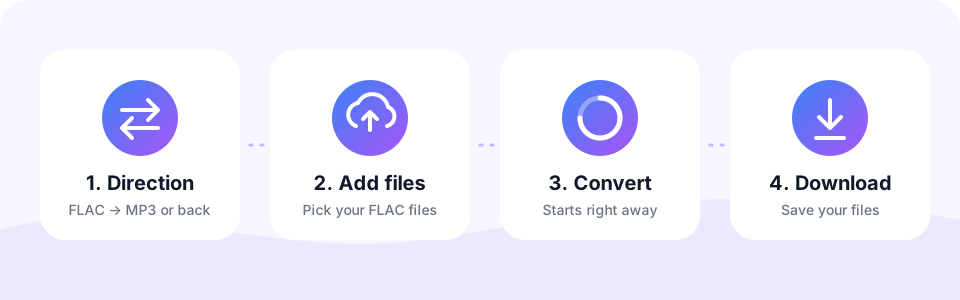
- Pick the directionKeep the FLAC → MP3 tab selected above the box. Tap MP3 → FLAC only when you need the reverse conversion.
- Check the MP3 qualityThe page starts at 320 kbps, the best match for a lossless source. Change the quality or turn on Mono before you add files, because each file keeps the settings it was added with.
- Add your FLAC filesTap Choose FLAC Files or drag the tracks onto the box. You can select a whole album at once, and the tracks convert one after another.
- Download your MP3sListen in the small player if you like, then tap Download next to a track. When two or more are ready, Download all saves the whole batch.
Converting MP3 to FLAC
Switch the converter to MP3 → FLAC when an app, editor or upload form only accepts FLAC files. The tool wraps your MP3 audio in a lossless FLAC file, so nothing further is lost during the conversion.
Keep expectations realistic, though: FLAC cannot bring back detail the MP3 already threw away. An MP3-to-FLAC file sounds exactly like the MP3, it is just larger. If you need true lossless quality, start from the original CD, WAV or studio master instead.
FLAC vs MP3: file size and sound quality
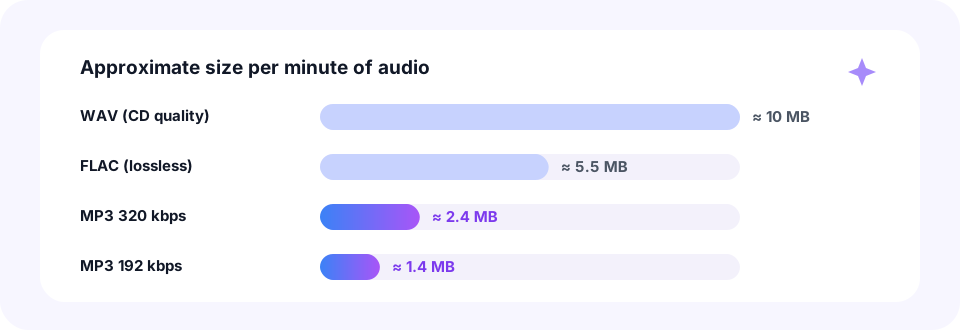
The biggest difference between the two formats is how much space they need. FLAC compresses audio without throwing anything away, so it lands at about half the size of a WAV file. MP3, by contrast, removes sounds that most people cannot hear and shrinks the file much further.
- FLAC (CD quality). Lossless, about 5 to 6 MB per minute, so a four-minute song is often 20 to 30 MB.
- MP3 320 kbps. About 2.4 MB per minute, or roughly 10 MB per song. Very hard to tell apart from FLAC on normal gear.
- MP3 192 kbps. About 1.4 MB per minute. Still very good, and great for phones that are short on storage.
- MP3 128 kbps. About 1 MB per minute. Fine for background music, but you may hear a little less sparkle in cymbals.
Is FLAC to MP3 conversion lossless?
No, and it is worth knowing why. MP3 is a lossy format, so some data is always removed when you convert FLAC to MP3. However, at 320 kbps the removed parts are sounds that are very hard to hear. In blind listening tests, most people cannot pick the MP3 from the FLAC on everyday headphones, phone speakers or a car system.
For that reason, treat the MP3 as your listening copy and the FLAC as your master. If you ever need AAC, OGG or a lower bitrate later, convert again from the FLAC rather than from the MP3. That way, each new copy starts from a perfect source instead of stacking one round of loss on top of another.
Hi-res FLAC, ALAC and whole albums
The converter reads standard 16-bit FLAC as well as hi-res 24-bit files at 96 or 192 kHz. Every MP3 it creates uses 44.1 kHz, the CD sample rate that MP3 players and car stereos expect. So a hi-res album comes out as a normal, widely compatible MP3 set.
Apple Lossless files (ALAC, usually ending in .m4a) and WAV files work here too, although our ALAC to MP3 and WAV to MP3 pages explain those formats in more detail. Meanwhile, batch conversion has no file count limit. Each file can be up to 500 MB, which covers even long hi-res live recordings.
Song titles, tags and cover art
The converter focuses on the sound itself. Song titles, artist names and cover art stored inside the FLAC are not copied into the new MP3, and each file keeps its original file name with an .mp3 ending. So, if your FLAC files are named like “01 - Artist - Title.flac”, your MP3s will be easy to sort.
To add tags afterwards, use a free tag editor. Mp3tag (Windows and Mac) and MusicBrainz Picard (Windows, Mac and Linux) can fill in titles and album art in a few clicks, often by looking up the album online.
Convert FLAC to MP3 on iPhone, Android, Mac or Windows
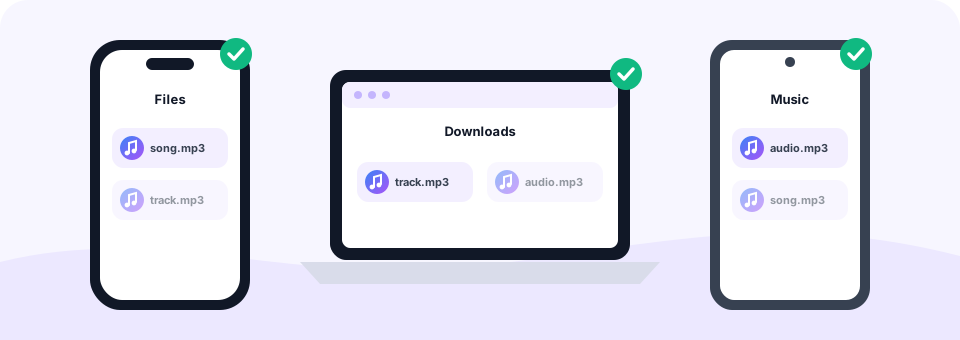
There is no app to install, because the converter runs in your web browser. On a Windows PC or a Mac, open this page in Chrome, Edge, Firefox or Safari, select your FLAC files and the MP3s land in your Downloads folder. That makes it a simple way to convert FLAC to MP3 without software such as foobar2000 or Audacity.
On Android, tap Choose FLAC Files and pick the tracks from your Music or Download folder; the MP3s are saved to Downloads. On an iPhone or iPad, open the page in Safari and pick the FLAC files from the Files app. Each MP3 then appears in Files, inside the Downloads folder, ready to play or share. Very large albums convert faster on a computer, because phones have less memory and power.
Why people convert FLAC files to MP3
FLAC is ideal for a home archive. Day to day, though, an MP3 copy is simply easier to live with. These are the most common reasons people make one:
- Car stereos and USB sticks. Many head units only read MP3 from a USB stick. Copy the converted album into a folder and it plays like any other track.
- Apple Music and iTunes. The Music app on Mac and iTunes on Windows do not import FLAC. MP3 files go straight into your library.
- Phones with little storage. A 320 kbps MP3 album takes far less room than the FLAC version, so you can carry much more music offline. For even smaller files, run them through our MP3 Compressor.
- Sharing a song. An MP3 is small enough to send in a chat or email, and the person you send it to can open it on any device.
Is this FLAC to MP3 converter safe?
Yes. Your music is converted inside your own browser with the Web Audio API, FFmpeg compiled to WebAssembly and the LAME MP3 encoder. As a result, your FLAC files are never uploaded to a server, and nobody else can see what you convert.
Beyond that, MP3 Converter is free, needs no account or email and adds no watermark or jingle to your files. There are no installers, browser extensions or pop-up download buttons to worry about. Finally, the finished MP3s only exist on your device until you save them, and they disappear from the page when you close the tab.
Frequently asked questions
Is this FLAC to MP3 converter free?
Yes. You can convert as many FLAC files to MP3 as you like for free, with no sign-up, no watermark and no software to install.
Is 320 kbps MP3 as good as FLAC?
Technically no, because MP3 removes some data. In practice, however, most people cannot hear a difference between a 320 kbps MP3 and FLAC on normal headphones, phone speakers or car systems.
Can I convert hi-res 24-bit FLAC to MP3?
Yes. The tool reads hi-res FLAC, such as 24-bit at 96 or 192 kHz, and creates a standard 44.1 kHz MP3 that plays on any device.
Can I batch convert a whole FLAC album?
Yes. Select all the tracks at once. They convert one after another, and Download all saves every MP3 when the batch is done. Each file can be up to 500 MB.
Are my FLAC files uploaded to a server?
No. The conversion happens entirely in your browser, so your music stays on your phone or computer the whole time.
Will the MP3 keep the song title and album art?
No. Only the audio is converted. You can add titles, artist names and cover art afterwards with a free tag editor such as Mp3tag or MusicBrainz Picard.
How do I convert FLAC to MP3 on iPhone?
Open this page in Safari, tap Choose FLAC Files and pick the tracks from the Files app. When they are done, tap Download and the MP3s are saved to Files in the Downloads folder.
Should I delete my FLAC files after converting?
We suggest you keep them. FLAC is your lossless master, so you can always create a new MP3, AAC or other copy from it later without extra quality loss.
Which bitrate should I choose for FLAC to MP3?
320 kbps gives the best sound and is the default here. Choose 256 or 192 kbps if you want smaller files for a phone, and 128 kbps only for background listening.
Does converting MP3 to FLAC improve the sound?
No. FLAC stores audio perfectly, but it can only store what the MP3 still contains. Use MP3 to FLAC for compatibility, not for better quality.
Why is my FLAC file bigger than the MP3?
FLAC is lossless, so it saves every sample without throwing anything away. Lossless files are typically several times larger than MP3s.
Related tools
We build free, privacy-first audio tools that run in your browser. This guide is checked against how the tool actually works. About us
Last updated: October 2026