 MP3 Converter
MP3 Cutter – Cut and Trim Audio Online
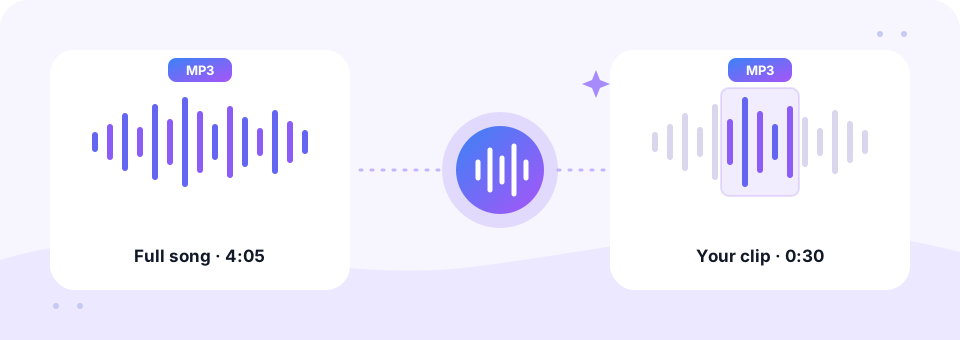
Our free MP3 cutter lets you trim any song, voice memo or video sound to the exact part you need, right in your browser. Drag two handles on the waveform, press Preview, add a fade if you like and save a new MP3 at up to 320 kbps. Your file never leaves your device.
- 100% Private
- No Limits
- Free
- Any Device
Upload an audio or video file to cut.
Works with MP3, WAV, M4A, FLAC, OGG, MP4, MOV, WEBM and more, up to 500 MB
or drag and drop a file here
Files are processed inside your browser and are never uploaded to a server.
A free online audio cutter that works without software
An MP3 cutter does one job well: it keeps the part of a recording you want and throws away the rest. For example, you might want the 30-second chorus of a song for a ringtone, a clean start to a voice memo, or a music bed that fits a video exactly. Full audio editors such as Audacity can do this, of course. However, they take time to install and learn, and on a phone they are not an option at all.
This online audio trimmer opens your file in the page and draws its waveform, so you can see the quiet gaps and loud parts at a glance. You can keep the selection or remove it, so cutting out a mistake in the middle is just as easy as trimming the ends. In addition, it reads far more than MP3: WAV, M4A, FLAC, OGG and the sound track of MP4, MOV or WEBM videos all load the same way. The result is always a standard MP3 that plays everywhere.
How to use the MP3 Cutter
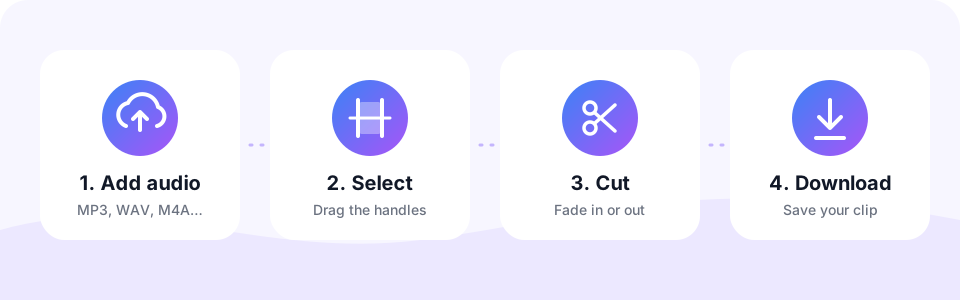
- Choose your audio or video fileTap Choose File or drag a file onto the box. MP3, WAV, M4A, FLAC, OGG, MP4, MOV, WEBM and more work, up to 500 MB. The waveform appears in a few seconds.
- Select the part with the handlesDrag the two purple handles, or type exact Start and End times in seconds. Press Preview to hear the selection before you save it.
- Keep or remove the selectionChoose Keep selection to save only that part, or Remove selection to delete it and join the rest. Turn on Fade in or Fade out for smooth edges.
- Cut and download the MP3Pick the MP3 quality and, if you want, Mono. Then press Cut & Save MP3, listen to the result on the page and tap Download.
What can you do with an MP3 cutter?
Most people open an MP3 cutter for one of a handful of everyday tasks. Here are the most common ones, plus the settings that work best for each.
- Make a ringtone or alarm sound. Keep 20 to 30 seconds of the chorus and turn on Fade out, so the ring ends softly instead of stopping mid-note.
- Clean up a voice recording. Trim the silence, the “is it recording?” moment and the fumbling at the end of a memo or interview.
- Remove a part from the middle. Select a cough, an ad break or a wrong take, then choose Remove selection. The parts before and after are joined for you.
- Fit music to a video. Cut the exact section that matches your clip length for a reel, a slideshow or a school presentation.
- Split a long file by hand. Save the first half, then load the file again and save the second half. It is a simple way to cut an MP3 into parts.
Trim audio precisely, down to a tenth of a second
Dragging is quick in this MP3 cutter, but sometimes you need a cut that lands exactly on a beat or between two words. So the MP3 cutter gives you three ways to fine-tune the selection.
- Type the times. Enter the start and end in seconds, for example 62.5 and 92.5 for a 30-second clip. The time next to each box shows it as minutes and seconds.
- Use the arrow keys. Click a handle, then press the left or right arrow to move it by 0.1 seconds. Hold Shift to move it by a full second.
- Watch the waveform. Flat parts of the wave are silence. Cutting there sounds natural, while cutting through a loud peak can sound abrupt.
- Check the length on the button. The Cut & Save MP3 button always shows how long the finished file will be, so you can hit a 30-second limit exactly.
Fade in and fade out for smooth edges
A hard cut in the middle of a song often leaves a small click or a sudden start. Turning on Fade in raises the volume gently at the start, and Fade out lowers it at the end. Each fade lasts up to three seconds, and on very short clips it uses a third of the clip, so it never swallows the whole selection.
As a rule, use both fades for ringtones and music clips. For speech, on the other hand, you can usually leave them off, because a cut in a pause already sounds clean. Since Preview plays the fades too, you can hear the difference before you save anything.
How big will your cut MP3 be?
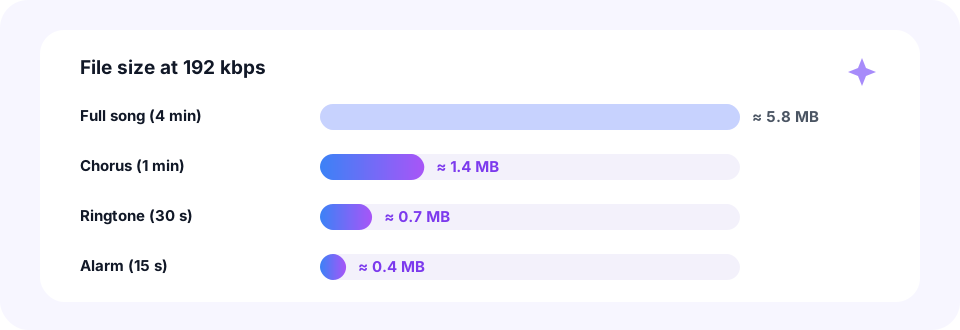
The size of an MP3 depends on its length and bitrate, so cutting a song down is also the easiest way to make it smaller. At the default 192 kbps, a full four-minute song takes about 5.8 MB, while a 30-second ringtone is only around 0.7 MB.
You can choose 128, 192, 256 or 320 kbps. For music, 192 kbps is a safe standard and 320 kbps keeps the most detail. Meanwhile, Mono is a good fit for speech clips. Keep in mind that the cut part is re-encoded once, so a bitrate equal to or higher than the original keeps the quality. To shrink a file even further, run it through our MP3 Compressor, which goes down to 32 kbps.
Cut MP3 files on iPhone, Android, Mac or Windows
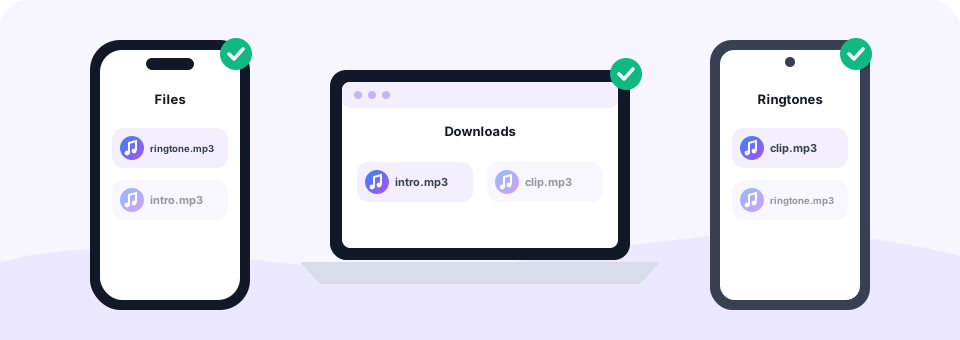
Because the MP3 cutter runs in your browser, it works the same on a phone and a computer, with nothing to install. On Windows or a Mac, open the page in Chrome, Edge, Firefox or Safari and drag a file from your Music or Downloads folder onto the box. The finished clip lands in Downloads.
On Android, tap Choose File and pick a song from your Music or Downloads folder. After you cut it, you can set it as a ringtone in Settings, then Sound, then Phone ringtone. On an iPhone, Safari saves the clip to the Files app in the Downloads folder. To use it as an iPhone ringtone, import it into GarageBand on the iPhone and export it as a ringtone from there.
Is this online MP3 cutter safe and private?
Many online MP3 cutter sites upload your song to a server, cut it there and send it back. This one does not. Your file is decoded and encoded inside your own browser, with the Web Audio API, FFmpeg compiled to WebAssembly for rarer formats, and the LAME MP3 encoder. As a result, a private voice memo or an unreleased demo never leaves your device.
There is also no sign-up, no watermark and no limit on how many files you cut. In short, MP3 Converter is free to use, and the only limit is the 500 MB file size, which covers hours of audio.
Cut the sound from a video or a recording
You can load a video straight into the MP3 cutter. It takes the sound track from an MP4, MOV, WEBM or MKV file, shows its waveform and saves your selection as MP3. That makes it handy for keeping one quote from a lecture or a song from a concert clip. If you want the whole sound track instead, our Video to MP3 converter handles many files at once.
Likewise, if you recorded a talk in several parts, cut each one here and then merge them with the Audio Joiner to get one tidy MP3.
Frequently asked questions
Is this MP3 cutter free?
Yes. You can cut and trim as many MP3 files as you like for free, with no account, no watermark and no software to install.
How do I make a ringtone with this MP3 cutter?
Load the song, select about 20 to 30 seconds, turn on Fade in and Fade out, then press Cut & Save MP3. Android can use the MP3 directly. On iPhone, import it into GarageBand and export it as a ringtone.
Can I remove a section from the middle of a song?
Yes. Select the unwanted part and choose Remove selection. The audio before and after it is joined into one MP3.
Does cutting an MP3 reduce the quality?
The part you keep is re-encoded once. Choose a bitrate equal to or higher than the original, such as 192 or 320 kbps, and the difference is very hard to hear.
Can I cut audio from a video file?
Yes. Load an MP4, MOV, WEBM or another video and the MP3 cutter works on its sound track. The result is always an MP3 audio file.
Are my files uploaded to a server?
No. The file is opened, cut and encoded inside your browser, so it never leaves your phone or computer.
How precise can the cut be?
You can type start and end times to a tenth of a second, or select a handle and move it with the arrow keys in 0.1 second steps. Hold Shift to move it by one second.
What is the largest file I can cut?
Files up to 500 MB work. Very long recordings need more memory, so a computer handles them more comfortably than an older phone.
Can I cut several MP3 files at once?
The MP3 cutter works on one file at a time so you can see and hear each cut. Choose another file when you are done with the first one.
Related tools
We build free, privacy-first audio tools that run in your browser. This guide is checked against how the tool actually works. About us
Last updated: October 2026