 MP3 Converter
WAV to MP3 & MP3 to WAV Converter
Our free WAV to MP3 converter shrinks large WAV recordings into small MP3 files that still sound great. It starts at 320 kbps, handles whole batches at once and runs right in your browser, so your audio never leaves your computer or phone. Need the opposite? Switch to MP3 → WAV to turn MP3 files into uncompressed WAV for editing, CDs or DJ software.
- 100% Private
- No Limits
- Free
- Any Device
Upload WAV files to convert to MP3.
Supported formats: WAV, WAVE, AIFF and more, up to 500 MB per file
or drag and drop files here
Files are processed inside your browser and are never uploaded to a server.
Why convert WAV to MP3, or MP3 to WAV?
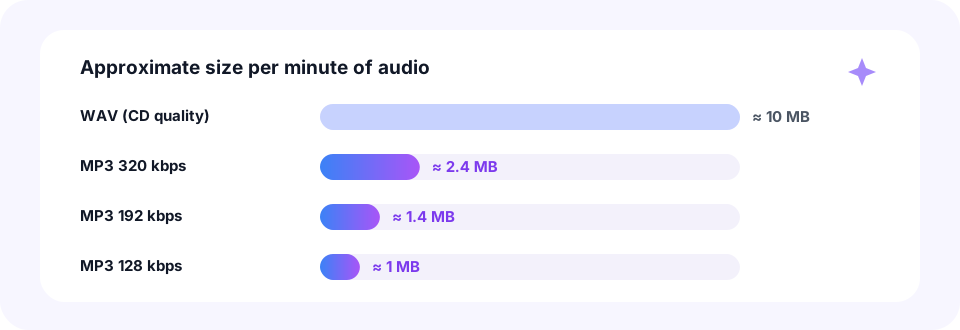
WAV stores sound without any compression. CD-quality WAV (16-bit, 44.1 kHz stereo) runs at about 1,411 kbps, which works out to roughly 10 MB for every minute. That is ideal for recording and editing. However, it is far too heavy for email, messaging apps or a phone that is short on space.
An MP3 at 320 kbps needs about 2.4 MB per minute, and at 192 kbps only 1.4 MB. So converting WAV to MP3 usually cuts the size by 75 to 90 percent, while most listeners hear no difference on everyday speakers and headphones. The tool also accepts AIFF, the uncompressed format many Mac apps use. Meanwhile, the same page works as an MP3 converter to WAV whenever an app or device insists on WAV files.
How to use the WAV to MP3 Converter
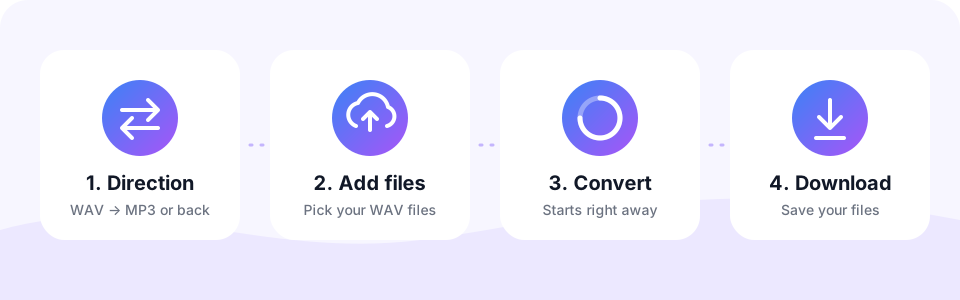
- Pick a direction and qualityLeave WAV → MP3 selected to shrink files, or tap MP3 → WAV to go the other way. For MP3 output the page starts at 320 kbps; change it before you add files if you want something smaller.
- Add your filesTap the button or drag a batch onto the box. Any .wav file works, whether it comes from Audacity, GarageBand, Logic Pro or a field recorder.
- Let it convertFiles are encoded one after another inside your browser, each with its own progress bar.
- Download the MP3sEach MP3 keeps the original file name. Tap Download, or Download all when you converted several.
Converting MP3 to WAV
Sometimes you need the opposite direction. Audio editors, DJ software, CD burning apps and some upload forms ask for WAV files, and a few older programs open nothing else. Switch the converter to MP3 → WAV, choose 44.1 kHz for music and CDs or 48 kHz for video projects, then add your MP3 files. Each one becomes a standard 16-bit PCM .wav file.
Keep in mind what this conversion can and cannot do. The WAV holds the MP3 sound exactly, so editing and saving it again adds no new loss. However, it cannot bring back detail the MP3 already removed, and the file grows to about 10 MB per minute. For speech, turning on Mono halves that size, because WAV stores every channel in full.
- Editing and mixing. Import a WAV into Audacity, GarageBand, FL Studio or Premiere Pro without decoding delays.
- Burning an audio CD. Many CD apps expect 44.1 kHz, 16-bit WAV, which is exactly what the 44.1 kHz option creates.
- DJ and sampler gear. Some hardware players and samplers only read WAV from a USB stick or SD card.
WAV vs MP3 file size at a glance
Here is what one minute of stereo audio takes in each format. As you can see, even the best MP3 setting is about four times smaller than the WAV.
In practice, a 4-minute song drops from about 40 MB to under 10 MB at 320 kbps. Likewise, a 30-minute interview recorded as WAV shrinks from roughly 300 MB to about 29 MB at 128 kbps.
Which bitrate is right for your WAV?
- 320 kbps. Finished songs, mixes and masters you want to share at the best MP3 quality.
- 256 kbps. Nearly the same sound in a slightly smaller file, good for playlists.
- 192 kbps. Demos and rough mixes you send to bandmates or clients.
- 128 kbps with Mono. Voice recordings, interviews and dictation from a field recorder such as a Zoom H1n.
Is WAV to MP3 lossless?
No. WAV is lossless, while MP3 is a lossy format that removes sounds most people cannot hear. At 256 or 320 kbps, the difference is very hard to notice on most speakers. Still, every MP3 conversion throws a little detail away, so it is a one-way trip.
For that reason, treat the WAV as your master and the MP3 as the copy you share. If you need to edit, remaster or make another format later, start again from the WAV. And if you also keep lossless FLAC files, our FLAC to MP3 converter works exactly the same way.
Converting 24-bit, 32-bit and 48 kHz WAV files
Recordings from a DAW or a video camera are often 24-bit or 32-bit float at 48 kHz or higher. The converter reads these too: your browser decodes most of them, and FFmpeg in WebAssembly steps in for the rest. Every MP3 is then created at 44.1 kHz, the standard rate for MP3 music.
Multichannel WAV files, such as 5.1 film mixes, are mixed down to stereo, so no channel is simply dropped. Meanwhile, a 500 MB limit per file applies, which equals roughly 50 minutes of CD-quality stereo WAV.
WAV to MP3 on Mac, Windows, iPhone and Android
On a Mac or Windows PC, drag WAV files from Finder or File Explorer onto the box, and the MP3 files land in your Downloads folder. This is the quickest route for exports from GarageBand, Logic Pro, Audacity or any other audio editor.
On an iPhone, open this page in Safari, tap Choose WAV Files and pick recordings from the Files app; most recorder apps can share a WAV to Files first. On Android, Chrome opens your file manager, and finished files go to Downloads. In both cases, there is nothing to install.
Safe, private WAV conversion
Unreleased songs and private interviews deserve care. That is why MP3 Converter encodes your WAV files inside the browser with the LAME MP3 encoder, and nothing is uploaded to a server. As a bonus, conversion is quick even for big files, because there is no upload to wait for.
- Nothing leaves your device. Your recordings are read and encoded locally.
- Free with no catch. There is no sign-up, no watermark and no daily cap.
- No software. It works in Safari, Chrome, Edge and Firefox.
When musicians and podcasters convert WAV to MP3
- Sharing demos. Send a mix to bandmates by email or chat without hitting attachment limits.
- Podcast episodes. MP3 plays in every podcast app, so convert the final WAV export before you publish.
- Sample previews. Make lightweight preview versions of WAV samples and loops.
- Combining takes. Join several MP3 files into one track with our Audio Joiner.
Frequently asked questions
Does converting WAV to MP3 lose quality?
Yes, a little, because MP3 is lossy. At 256 or 320 kbps the difference is very hard to hear for most people on most speakers.
What is the best bitrate for WAV to MP3?
320 kbps for music, which is why the page starts there. For speech, 128 kbps with Mono turned on is plenty.
How much smaller is an MP3 than a WAV?
About 4 times smaller at 320 kbps and about 10 times smaller at 128 kbps. One minute of CD-quality WAV is roughly 10 MB.
Can I convert 24-bit or 32-bit WAV files?
Yes. High-resolution WAV files are supported. The MP3 is created at 44.1 kHz, the standard rate for MP3 music.
How many WAV files can I convert at once?
There is no fixed limit. Files are processed one after another to keep your device responsive.
Is there a size limit?
Each file can be up to 500 MB, which is roughly 50 minutes of CD-quality stereo WAV.
Are my WAV files uploaded?
No. Everything happens inside your browser, so your recordings never leave your device.
Can I convert MP3 to WAV on this page?
Yes. Tap the MP3 → WAV tab above the converter, choose 44.1 or 48 kHz and add your MP3 files. Each one is saved as a 16-bit PCM WAV file.
Can I convert AIFF files here too?
Yes. AIFF works the same way as WAV, since both are uncompressed formats.
Can I convert WAV to MP3 on iPhone?
Yes. Save the WAV to the Files app, open this page in Safari, tap Choose WAV Files and pick it. The MP3 is saved to Files in the Downloads folder.
Does converting MP3 to WAV improve the quality?
No. The WAV keeps the MP3 sound exactly, but it cannot add back detail the MP3 removed. Convert MP3 to WAV for compatibility and editing, not for better sound.
Why is my WAV so much bigger than the MP3?
WAV is uncompressed, so it stores every sample in full: about 10 MB per minute in stereo at 44.1 kHz, compared with roughly 1 to 2.4 MB for an MP3.
Which sample rate should I pick for MP3 to WAV?
Choose 44.1 kHz for music and audio CDs, and 48 kHz if the WAV is going into a video editor.
Related tools
We build free, privacy-first audio tools that run in your browser. This guide is checked against how the tool actually works. About us
Last updated: October 2026