 MP3 Converter
OGG to MP3 & MP3 to OGG Converter
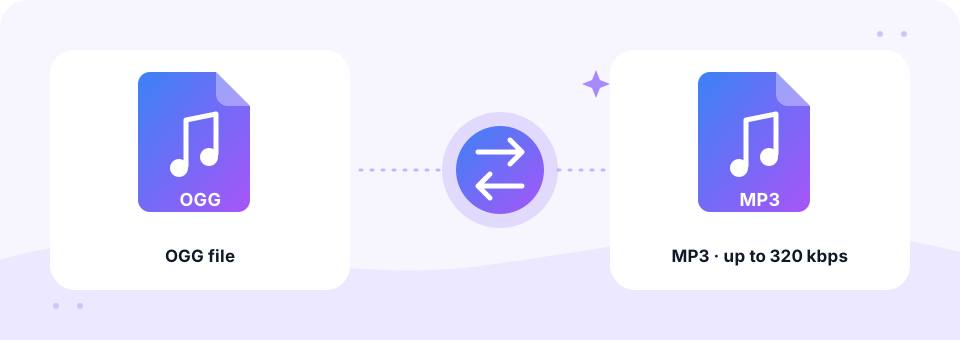
Our free OGG to MP3 converter turns OGG Vorbis and OGG Opus audio into MP3 files that play on iPhone, Windows, car stereos and every media player. Add as many files as you like and pick up to 320 kbps; the conversion runs privately in your browser. You can also flip it to MP3 to OGG.
- 100% Private
- No Limits
- Free
- Any Device
Upload OGG files to convert to MP3.
Supported formats: OGG, OGA, Vorbis, OPUS and more, up to 500 MB per file
or drag and drop files here
Files are processed inside your browser and are never uploaded to a server.
What is an OGG file, and why convert it?
OGG is an open, royalty-free container from the Xiph.Org Foundation. Inside, it usually holds Vorbis audio, and sometimes Opus. Because it costs nothing to use, you meet it in many places: game sound folders, Wikimedia Commons recordings, Linux apps, Audacity exports, Telegram and Discord voice messages, and audio recorded in Firefox.
The trouble is that OGG support is patchy outside the browser. Apple Music and iTunes do not import it, older iPhones will not play it, and many car stereos and portable players skip it. So converting OGG to MP3 is the quickest way to get a file that works for everyone. On the other hand, when a game engine or open-source project wants OGG, the MP3 to OGG tab handles that too.
How to use the OGG to MP3
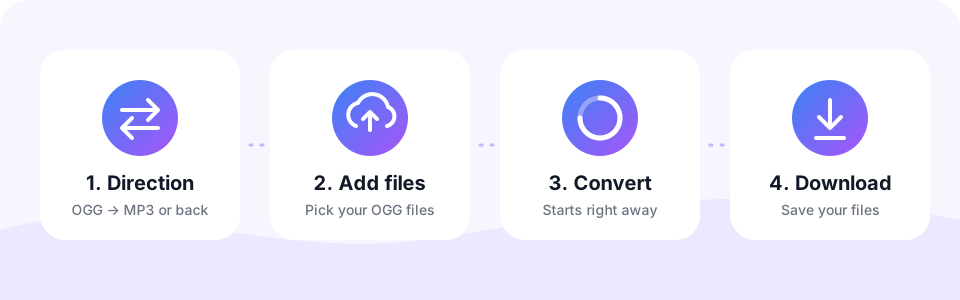
- Select OGG → MP3This tab is already active when the page opens. Tap MP3 → OGG only if you want the opposite conversion.
- Pick the MP3 quality192 kbps is the default and suits most OGG music. Turn on Mono for voice messages. Choose your settings before adding files, because each file keeps the settings it was added with.
- Add the OGG filesTap Choose OGG Files or drop .ogg and .oga files onto the box. Several files convert one after another.
- Download the MP3sCheck the result in the built-in player, then tap Download. Once two or more files are done, Download all saves them together.
Converting MP3 to OGG
OGG Vorbis is open and royalty-free, which is why game developers, Linux software and many open-source projects prefer it. Game engines such as Godot and Unity handle OGG music and sound effects very well, and it often loops more cleanly than MP3.
Pick MP3 → OGG, choose a bitrate (160 to 192 kbps suits music, 96 kbps mono suits voice) and convert your files in one batch. Keep the original MP3s in case you need them later.
OGG vs MP3: size, quality and support
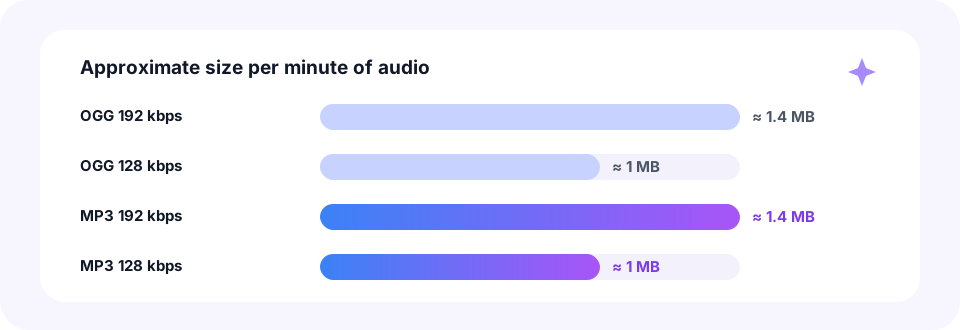
At the same bitrate, OGG Vorbis and MP3 files are the same size, because bitrate decides size. Vorbis tends to sound slightly better at low bitrates, while above about 192 kbps most listeners cannot tell the two apart. The real difference is support: MP3 plays on practically everything, OGG does not.
- OGG Vorbis 128 kbps. About 1 MB per minute. Common for game music and web audio.
- OGG Vorbis 192 kbps. About 1.4 MB per minute. Very good quality for music.
- MP3 192 kbps. About 1.4 MB per minute and the best default when converting OGG music.
- MP3 320 kbps. About 2.4 MB per minute. Worth it only if the OGG itself is high quality.
Will OGG to MP3 conversion lose quality?
A tiny amount, yes. Vorbis and MP3 are both lossy, so the tool first decodes the OGG to plain audio and then encodes a fresh MP3. As long as you choose an MP3 bitrate at or a little above the original, that extra loss is very hard to hear.
Keep in mind that MP3 cannot add back detail the OGG never had. So a low-quality 64 kbps OGG will not improve at 320 kbps; it will just take more space. For most files, 192 kbps is the sweet spot.
Game sounds, Telegram voice messages and other OGG sources
- Game music and sound effects. Many games and engines, including Minecraft resource packs and Godot projects, store sounds as .ogg. Convert the files you have the right to use, and extract them from game archives first.
- Telegram and Discord voice messages. Saved voice messages usually end in .ogg and contain Opus speech. Our OPUS to MP3 page has extra tips for voice notes.
- Wikimedia Commons audio. Pronunciations, speeches and historic recordings are often published as OGG. Check each file’s licence before reusing it.
- Browser and Linux recordings. Firefox, Audacity and many Linux tools record or export OGG. Recordings that end in .webm instead convert on our WEBM to MP3 page.
OGG to MP3 on iPhone, Android, Mac or Windows
You do not need VLC, Audacity or any other software to convert OGG to MP3. The tool runs in Chrome, Edge, Firefox and Safari, so it works the same on a Windows PC, a Mac or a Chromebook. Finished MP3s are saved to your Downloads folder.
On Android, open the page in Chrome, tap Choose OGG Files and pick the file from Downloads or Telegram’s folder. On an iPhone or iPad, use Safari and choose the OGG from the Files app. If Safari cannot read the file on its own, the built-in FFmpeg decoder loads automatically the first time and handles it. The MP3 then appears in Files under Downloads.
Common questions about OGG files
Is OGG better than MP3? For sound per kilobit, Vorbis is often slightly better. For compatibility, MP3 wins easily. That is why many people keep OGG for games and the web, and MP3 for listening.
Can I convert OGG to MP3 without losing tags? Only the audio is converted here, so titles and artist names are not carried over. Each MP3 keeps the original file name, and you can add tags later with a free editor such as Mp3tag.
Why will my OGG file not open at all? It may be damaged, empty or not really an audio file. Some games also pack sounds into their own archive formats, which need extracting before they become normal .ogg files.
Private, free and safe OGG conversion
This OGG to MP3 converter works right inside your browser with the Web Audio API, FFmpeg compiled to WebAssembly and the LAME MP3 encoder. As a result, nothing is uploaded, and your voice messages and recordings never leave your device.
In addition, MP3 Converter is free, needs no account and adds no watermark. There is nothing to install and no limit on how many files you convert, while each single file can be up to 500 MB.
Frequently asked questions
Is this OGG to MP3 converter free?
Yes. Convert as many OGG files as you want for free, with no sign-up, no watermark and no software to install.
Why will my iPhone not play OGG files?
Older versions of iOS and the Apple Music app do not support OGG. Converting the file to MP3 is the simplest fix, and it works directly in Safari.
Does it support OGG Opus as well as Vorbis?
Yes. Both Vorbis and Opus audio inside an OGG file convert to MP3, and .oga files work too.
What bitrate should I choose for OGG to MP3?
192 kbps suits most OGG music. Choose 256 or 320 kbps for high-quality sources, and 128 kbps with Mono for voice messages.
Can I batch convert OGG to MP3?
Yes. Select or drop several files at once. They convert one after another, and Download all saves every finished MP3.
Are my OGG files uploaded to a server?
No. The conversion runs entirely in your browser, so your files stay on your device.
Can I convert game sound files?
Yes, if they are standard OGG files and you have the right to use them. Sounds packed inside game archives must be extracted first.
Can I convert a Telegram voice message to MP3?
Yes. Save the voice message to your device, which gives you an .ogg file, then add it here. Turn on Mono for the clearest result.
Why convert MP3 to OGG for games?
OGG Vorbis is royalty-free, widely supported by game engines and usually loops without the tiny gap MP3 files can have at the start.
Which bitrate should I use for OGG?
Around 160 to 192 kbps for music and 96 kbps for speech or simple sound effects.
Related tools
We build free, privacy-first audio tools that run in your browser. This guide is checked against how the tool actually works. About us
Last updated: October 2026